Tired of typing every expense?
Upload a PDF or image of your statement. Review the detected transactions before saving them.
Explore statement imports ↗ Finfu AI
Import statements, record transactions by text or voice, and ask about your spending. Your accounts and cards, together in one place.
Available in your browser · Mobile downloads are temporarily paused.
Start with the question you have today. You do not have to explore the entire app to find something useful.
Upload a PDF or image of your statement. Review the detected transactions before saving them.
Explore statement imports ↗Ask about spending, upcoming payments or a balance change. The assistant checks the data you recorded.
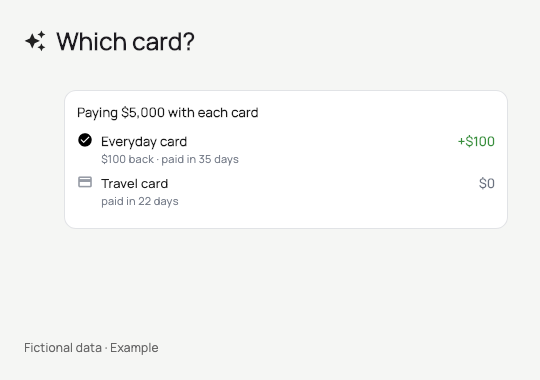
Explore the assistant ↗Compare a purchase across your cards using the amount, repayment period and benefits you have recorded.
Compare your options ↗Real components · Example data
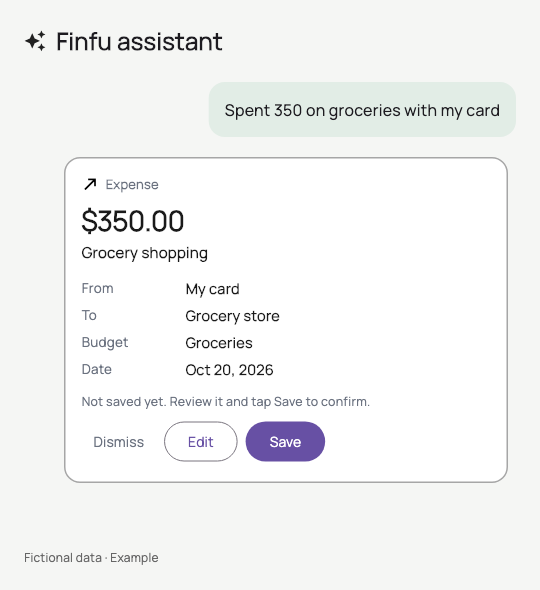
“Spent 350 on groceries with my card.” The assistant prepares a transaction for you to review and confirm.
Real components · Example data
Compare estimated costs, benefits and time until payment using the information on your cards.
Open Finfu in your browser and review the available plans.
Record an account and transactions manually or with your plan’s import options.
Review your spending or compare a purchase across the cards you added.
Everyday organization with Essential. More AI assistance with Intelligent.
Review current prices, usage limits and terms before subscribing. AI features have plan-specific usage limits. Trial availability is displayed during checkout.
Yes. You can use the web app in your browser. iOS and Android downloads are temporarily paused.
No. Add your data manually or use the available import options. Uploading a file does not create an ongoing bank connection.
PDF and supported images such as JPG and PNG. Reading depends on file quality and format. Review detected transactions before saving them. CSV is not available.
No. It prepares records and actions inside Finfu for you to review and confirm. Actual payments and transfers take place through your bank.
Essential provides limited assistant access. Intelligent expands AI features. Review current limits and terms on the subscription screen.
It uses the data you record or attach to answer your questions. See the privacy policy for details on data processing and service providers.
No. It compares estimates based on your data, repayment period and recorded benefits. Check applicable terms and promotions with your bank.
Open Finfu and start with one account, one transaction and one question.